ABC Procreate Brush Stamp Polka Dot: A Review for Digital Designers
Digital illustration has evolved significantly with the introduction of specialized tools that streamline the creative process. Among these tools, custom brush sets have become essential assets for artists using iPad-based applications. The ABC Procreate Brush Stamp Polka Dot is a specific digital resource designed to simplify the creation of typographic and patterned designs. This article evaluates the functionality, utility, and limitations of this brush set to help designers determine if it aligns with their workflow and project requirements.
Understanding the Tool and Its Core Functionality
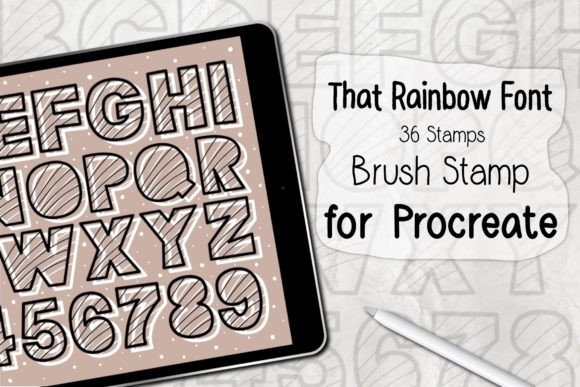
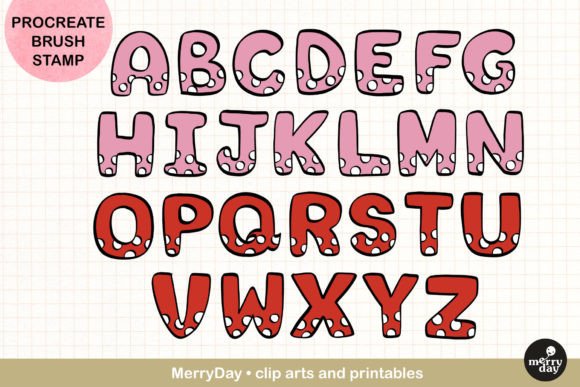
The ABC Procreate Brush Stamp Polka Dot is a niche digital asset comprising two primary components: a set of 26 alphabet letter stamps and a polka dot texture element. Unlike standard drawing brushes that rely on pressure sensitivity and stroke dynamics, stamp brushes function by placing pre-designed shapes onto the canvas with a single tap. This mechanism shifts the focus from manual lettering or shape drawing to composition, spacing, and color application.
Technically, this tool is built exclusively for the Procreate application on iPad. It requires Procreate App Version 5.0 or higher to function correctly. The file is distributed in a ZIP format, which, when opened on an iPad, automatically imports the brushes into the Procreate library. This ease of installation is a significant advantage for users who may not be technically inclined, as it removes the complexity of manual file management often associated with desktop software.
Practical Applications and Use Cases
The versatility of stamp brushes makes them suitable for a wide range of design projects. The inclusion of both alphabetic characters and decorative polka dots allows for layered creativity. Here are several scenarios where this tool proves particularly effective:
- Stationery and Card Design: Creating personalized greeting cards becomes faster when letters can be stamped rather than drawn. The polka dot element adds a playful background or border option without requiring complex pattern tools.
- Journaling and Stickers: For digital journal enthusiasts, consistency is key. Stamp brushes ensure uniform letter height and style, which is difficult to achieve with freehand drawing. These elements can be exported as PNGs to create physical stickers or used directly in digital planners.
- Event Materials: Party posters, invitations, and gift tags often require bold, clear typography combined with festive graphics. The combination of letters and dots allows for rapid prototyping of layouts for birthdays, baby showers, or seasonal events.
- Sublimation and Merchandise: Designers creating assets for t-shirts, bags, or other sublimation art benefit from the clean edges of stamp brushes. The vectors-like quality of the stamps ensures that designs remain crisp when scaled for print-on-demand products.
Evaluating the Benefits
The primary advantage of using the ABC Procreate Brush Stamp Polka Dot is efficiency. For designers who need to produce high volumes of content, such as social media graphics or printable downloads, reducing the time spent on repetitive tasks is crucial. By eliminating the need to draw each letter individually, artists can focus on color theory, layout balance, and overall aesthetic appeal.
Furthermore, the tool encourages experimentation. Because the effort required to place a letter is minimal, users are more likely to try different arrangements and color palettes. This low barrier to entry can help overcome creative block, making the design process more enjoyable and less intimidating for beginners. The ability to recolor stamps instantly using Procreate’s adjustment layers also provides flexibility that traditional physical stamps cannot offer.
Limitations and Technical Considerations
While the benefits are clear, it is important to acknowledge the limitations of this tool. The most significant constraint is its compatibility. These brushes are designed strictly for Procreate on iPad. They do not work in Adobe Photoshop, Clip Studio Paint, or any desktop-based illustration software. Designers who rely on a multi-platform workflow will find this tool isolated to their mobile device environment.
Additionally, stamp brushes offer less organic variation than hand-drawn text. Every "A" stamped from the brush will look identical unless manually rotated, resized, or distorted. For projects requiring a highly personalized, hand-lettered feel, this uniformity might appear too rigid or mechanical. Users may need to spend additional time adjusting individual letters to break up the repetition and create a more natural look.
Another consideration is the resolution dependency. While Procreate handles high-resolution canvases well, the quality of the final output depends on the canvas size set by the user. If the canvas is too small, the stamped letters may appear pixelated when printed on larger formats like posters or t-shirts. Users must ensure they start with a sufficiently large document to maintain print-quality standards.
Decision-Making Insights: Is This Tool Right for You?
Choosing whether to incorporate the ABC Procreate Brush Stamp Polka Dot into your toolkit depends on your specific design goals and technical setup. This tool is a strong fit if you primarily work on an iPad, use Procreate regularly, and need to produce text-heavy designs quickly. It is particularly valuable for small business owners creating branded materials, educators making classroom resources, or hobbyists interested in digital scrapbooking.
However, alternatives may be worth considering if you require cross-platform compatibility or highly customized typography. If you work extensively in Photoshop or Illustrator, investing in vector fonts or custom action sets might provide greater flexibility. Similarly, if your artistic style relies on loose, expressive lettering, practicing hand-lettering techniques or using calligraphy brushes may yield more authentic results than stamping pre-made shapes.
It is also essential to manage expectations regarding the learning curve. While the tool is easy to install, mastering the art of composition with stamps takes practice. Understanding how to layer colors, adjust opacity, and integrate the polka dot elements harmoniously with the letters requires a basic understanding of design principles. The tool simplifies the creation of elements but does not replace the need for good design judgment.
Final Thoughts on Workflow Integration
The ABC Procreate Brush Stamp Polka Dot represents a practical solution for specific digital design challenges. It bridges the gap between complex typography tools and simple drawing apps, offering a middle ground that prioritizes speed and consistency. By automating the creation of letters and patterns, it allows artists to focus on the broader creative vision rather than getting bogged down in repetitive details.
For those who value efficiency and enjoy the tactile experience of designing on an iPad, this brush set can significantly enhance productivity. It transforms mundane tasks into quicker, more enjoyable processes, enabling creators to produce professional-looking stationery, merchandise, and digital art with greater ease. However, users must remain aware of its platform restrictions and the stylistic uniformity inherent in stamp-based tools. When used appropriately within its intended context, it serves as a valuable asset in the modern digital artist’s toolkit.