Unlocking Textured Creativity: A Complete Guide to Grainy Boho Brushes for Procreate
In the rapidly evolving world of digital art, texture is often the secret ingredient that transforms a flat illustration into a piece that feels tactile, organic, and alive. For artists using the iPad, Procreate has become the industry standard, offering a robust suite of tools that mimic traditional media. However, one specific aesthetic has captured the hearts of designers, illustrators, and hobbyists alike: the Grainy Boho style. This article explores the significance of grainy boho brushes, how they fit into modern creative workflows, and provides a practical guide to integrating them into your artistic toolkit.
Understanding the Grainy Boho Aesthetic
The term "Boho," short for bohemian, refers to an artistic lifestyle characterized by free-spiritedness, eclectic influences, and a connection to nature. When applied to digital design, the boho aesthetic often features earthy color palettes, organic shapes, and hand-drawn elements. Adding a "grainy" texture to this style introduces a layer of imperfection that mimics traditional print techniques, such as risograph printing, screen printing, or drawing on textured paper.
Why is this significant? In a digital landscape that can sometimes feel too clean or sterile, grain adds warmth and nostalgia. It bridges the gap between the precision of vector graphics and the soulful unpredictability of hand-made art. For businesses, this style is particularly effective in branding for wellness companies, boutique cafes, and artisanal products, where authenticity is a key selling point. For educators and students, it offers a way to create engaging, visually soft materials that are easy on the eyes and inviting to explore.
The Role of Texture in Modern Digital Art
Texture serves more than just a decorative purpose; it guides the viewer’s eye and adds depth to a two-dimensional plane. In the context of Procreate, brushes are the primary vehicle for applying these textures. A high-quality brush set does not merely stamp an image onto the canvas; it interacts with the Apple Pencil’s pressure sensitivity, tilt, and speed to create dynamic strokes that feel natural.
Consider the difference between a solid digital circle and one drawn with a grainy charcoal brush. The latter contains micro-variations in opacity and density, suggesting light, shadow, and material substance. This level of detail is crucial for artists who want their work to stand out in crowded social media feeds or professional portfolios. It demonstrates a mastery of digital tools that goes beyond basic shape creation.
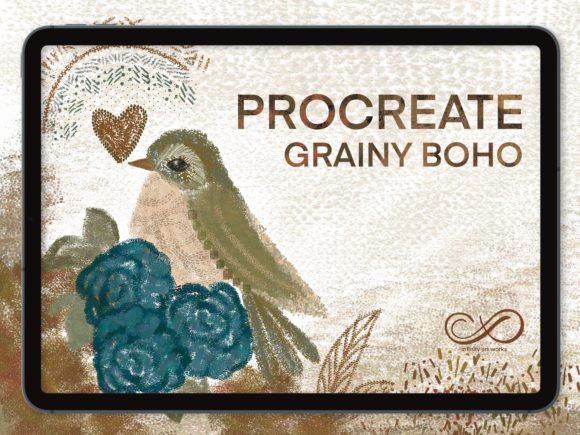
Introducing the Hello This Grainy Boho Collection
For those looking to elevate their digital artwork without spending hours creating custom brushes from scratch, curated sets like the Hello This Grainy Boho collection offer an immediate solution. This specific package is designed to provide versatility and ease of use, containing 50 unique Procreate grainy boho brushes. Whether you are illustrating children’s books, designing social media graphics, or creating pattern designs for textiles, this set covers a broad spectrum of textural needs.
The value of such a collection lies in its curation. Instead of sifting through hundreds of low-quality options, artists get a focused toolkit where each brush serves a distinct purpose. Some may offer heavy, coarse grains suitable for bold backgrounds, while others provide subtle, fine speckles perfect for adding nuance to character illustrations. This variety allows for layering and complex compositions, enabling artists to build rich visual narratives.
Compatibility and Technical Requirements
Before diving into the creative possibilities, it is essential to understand the technical framework. These are digital brushes, which means they are software-specific tools. They will only work within the Procreate App on iPad. To ensure the best experience, users should have an iPad Pro, a standard iPad compatible with the latest Procreate updates, and an input device that supports pressure sensitivity.
The Apple Pencil is the recommended tool, as it offers the most precise control over line weight and opacity. However, other third-party styluses that support pressure sensitivity can also be used effectively. It is important to note that these brushes will not function in Photoshop, Illustrator, or other desktop-based software unless specifically converted, which is often a complex and imperfect process. Therefore, ensuring your hardware and software are up to date is the first step toward a smooth workflow.
Step-by-Step Installation Guide
Installing new brushes in Procreate is a straightforward process, but first-time users may find it slightly unintuitive. Follow these steps to get started with your new grainy boho tools:
- Purchase and Confirmation: After completing your purchase from Infinity Art Works, you will receive an email confirmation. This email contains the secure download link for your brush files. Check your spam folder if you do not see it within a few minutes.
- Download the Files: Click the link to download the brush set. The file will typically be in a format compatible with Procreate (such as .brushset). Save this file to your iPad’s Files app or iCloud Drive for easy access.
- Import into Procreate: Open the Procreate app. Tap on the brush icon in the top right corner to open the Brush Library. At the very top of the list, you will see a plus sign (+) or an "Import" button. Tap this, navigate to where you saved the downloaded file, and select it. The 50 brushes will instantly appear in your library, ready to use.
Once imported, it is advisable to organize these brushes into a dedicated group within Procreate. This keeps your workspace tidy and allows you to quickly switch between your standard tools and your new grainy boho assets.
Practical Applications and Creative Ideas
Now that you have the tools installed, how can you use them effectively? Here are a few practical examples to inspire your next project:
- Social Media Graphics: Use coarse grain brushes to create textured backgrounds for Instagram quotes or promotional posts. The imperfect edges add a human touch that resonates with audiences tired of overly polished corporate aesthetics.
- Digital Scrapbooking: Combine various grainy shapes—such as leaves, abstract blobs, and sunbursts—to create digital scrapbook pages. The texture mimics the look of cut paper and ink stamps, perfect for preserving memories with a vintage flair.
- Pattern Design: Create seamless patterns for fabric or wallpaper by repeating grainy motifs. The variation in texture ensures that the pattern does not look repetitive or mechanical, adding depth to interior design projects.
- Educational Materials: Teachers and content creators can use these brushes to make worksheets and presentations more engaging. Hand-drawn diagrams with a grainy texture feel approachable and less intimidating than rigid vector graphics.
Common Misconceptions About Digital Textures
A common misunderstanding is that using pre-made brushes is "cheating" or lacks artistic integrity. In reality, professional artists have always used tools to aid their creativity—from specific types of paper to specialized paints. Digital brushes are simply the modern equivalent. They save time on technical setup, allowing the artist to focus on composition, color theory, and storytelling. The skill lies not in creating the brush, but in knowing how to wield it to express a vision.
Another assumption is that grainy textures are only suitable for rustic or vintage styles. While they excel in boho aesthetics, these brushes can also be used in modern minimalist designs to add subtle interest, or in futuristic concepts to create a distressed, cyberpunk look. Versatility is key.
Conclusion
The Hello This Grainy Boho collection represents more than just a set of digital tools; it is an invitation to explore the warmth and imperfection of analog art within the convenience of the digital realm. By understanding the purpose of texture, ensuring technical compatibility, and practicing with intention, artists of all levels can enhance their work significantly. Whether you are a seasoned illustrator or a beginner just starting your journey with Procreate, these 50 brushes offer a pathway to richer, more expressive creativity. Thank you for shopping with Infinity Art Works, and happy creating!