Enhancing Digital Bakery Art with Croissant Bakery Procreate Brush Stamps
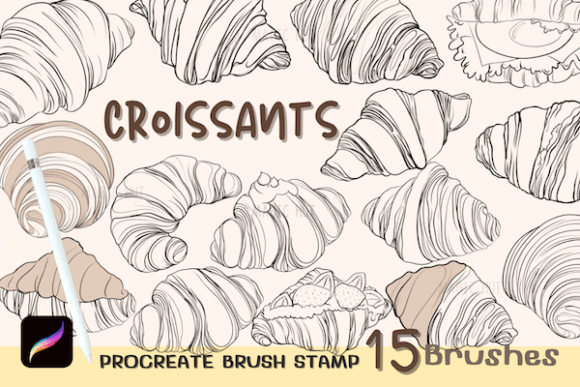
For digital illustrators, food bloggers, and graphic designers specializing in culinary themes, the ability to render realistic baked goods quickly is a valuable skill. The Croissant Bakery Procreate Brush Stamps offer a specialized solution for this niche, providing a set of fifteen distinct croissant illustrations designed specifically for the Procreate application on iPad. Unlike general-purpose sketching tools, these stamps are engineered to replicate the flaky, golden-brown texture of fresh pastries, allowing artists to populate scenes, design menus, or create social media content with professional-grade consistency.
This resource arrives as a single zip file containing one .brushset file. Once imported, users gain immediate access to a library of pre-rendered croissant shapes that can be scaled, rotated, and recolored. While the convenience of stamp-based workflows is undeniable, understanding how these tools fit into a broader digital art toolkit requires an evaluation of their specific strengths, limitations, and ideal use cases compared to hand-drawn alternatives or generic asset libraries.
Understanding the Workflow and Technical Requirements
The primary appeal of the Croissant Bakery Procreate Brush Stamps lies in their ease of integration into the Procreate ecosystem. The setup process is straightforward: users download the zip file, unzip it to reveal the brush set, and import it directly into their Procreate Brush Library. This simplicity lowers the barrier to entry for artists who may not have advanced technical skills in file management or software configuration.
However, it is crucial to note the strict hardware and software dependencies. These brushes function exclusively within the Procreate app on iPadOS. They require an iPad paired with an Apple Pencil or a stylus that supports pressure sensitivity. This requirement ensures that users can manipulate the stamps with precision, but it also means that artists working primarily on desktop platforms using Photoshop, Clip Studio Paint, or other raster graphics editors cannot utilize this specific tool. For those invested in the Adobe ecosystem or Android-based tablets, this limitation necessitates looking toward alternative formats such as PNG clipart packs or Photoshop-specific brush files.
Once installed, the workflow is highly flexible. Each of the fifteen stamps can be tapped onto the canvas and then adjusted using Procreate’s native transform tools. Artists can resize the croissants to fit foreground or background elements, adjust opacity for depth effects, or modify the color balance to match different lighting conditions or baking levels. This level of control allows for a degree of customization that static image assets often lack, bridging the gap between pre-made graphics and original illustration.
Comparing Stamp Brushes to Hand-Drawn Illustrations
When deciding whether to incorporate Digital Brush Stamps like the Croissant Bakery set into your workflow, it is helpful to compare them against traditional hand-drawing methods. Hand-drawing every pastry offers ultimate creative freedom and uniqueness, which is essential for high-end editorial illustrations or bespoke branding projects where every detail must be original. However, this approach is time-intensive and requires a high level of technical proficiency in rendering textures like dough layers and glazes.
In contrast, the Food Brush Stamp approach prioritizes efficiency and consistency. For projects such as designing a bakery menu, creating Instagram story templates, or illustrating a children’s book about baking, speed and visual coherence are often more critical than unique artistic flair. Using a standardized set of fifteen croissant variations ensures that all items in a scene share the same stylistic language, preventing the visual disjointedness that can occur when mixing different drawing styles or sourcing images from multiple free repositories.
The trade-off is a potential loss of individuality. Since these stamps are pre-designed, multiple users may end up with similar-looking croissants in their portfolios. To mitigate this, experienced artists often use the stamps as a base layer, adding hand-drawn details, shadows, or highlights on top. This hybrid approach leverages the speed of the stamp while retaining the unique touch of the artist, offering a balanced middle ground between pure automation and manual creation.
Evaluating Versatility and Design Applications
The versatility of the Bakery Brush Stamp set extends beyond simple illustration. Because the stamps are vector-like in their scalability within Procreate, they can be adapted for various design contexts. For instance, a graphic designer might use a large, high-opacity croissant as a central focal point in a promotional poster, while using smaller, lower-opacity versions as a subtle pattern in the background. This layering technique adds depth and interest without cluttering the composition.
Moreover, the ability to change colors opens up creative possibilities beyond realistic depictions. Artists can experiment with non-traditional hues to create whimsical or fantasy-themed bakery scenes, such as purple lavender croissants or green matcha-infused pastries. This flexibility makes the set useful not only for realistic food illustration but also for abstract design projects where the shape of the croissant serves as a recognizable symbol rather than a literal representation.
It is important to consider the scope of the set. With fifteen stamps, the variety is sufficient for most small to medium-sized projects. However, for large-scale commercial campaigns requiring dozens of unique pastry types, this set may need to be supplemented with other resources. Users should evaluate whether the fifteen variations cover the angles and styles needed for their specific project. If a project requires extreme close-ups or highly specific lighting angles not present in the set, additional custom drawing or supplementary asset packs may be necessary.
Decision Factors: When to Choose This Tool
Choosing the Croissant Bakery Procreate Brush Stamps depends largely on your current workflow and project requirements. This tool is an excellent fit for:
- Content Creators: Social media managers and food bloggers who need to produce high-quality visuals quickly and consistently.
- Small Business Owners: Bakery owners designing their own menus, packaging, or promotional materials without hiring a dedicated illustrator.
- Digital Artists: Illustrators who want to speed up their background elements or repetitive objects to focus more on character design or composition.
- Educators and Hobbyists: Individuals learning digital art who want to understand how stamp brushes work without the steep learning curve of creating complex textures from scratch.
Conversely, this tool may not be the right choice if you require full copyright exclusivity, as stamp sets are typically licensed for use but not for resale as standalone assets. Additionally, if you do not own an iPad or prefer working in Photoshop, the incompatibility renders this specific product unusable. In such cases, seeking out high-resolution PNG clipart or Photoshop-compatible brush sets would be a more practical alternative.
Maximizing Value Through Customization
To get the most out of your Procreate Brush Stamp investment, consider exploring the full range of Procreate’s adjustment features. While the stamps come with predefined colors and textures, using the Hue, Saturation, and Brightness sliders can dramatically alter their appearance. Combining different stamps on separate layers allows for complex compositions, such as a basket overflowing with pastries, where each croissant can be individually adjusted for lighting and shadow.
Furthermore, integrating these stamps with other Procreate brushes can enhance realism. Adding a textured overlay brush or a soft airbrush for shadows can help the stamps blend seamlessly into hand-drawn environments. This technique ensures that the digital nature of the stamps does not clash with organic elements in the artwork, maintaining a cohesive and professional look.
In conclusion, the Croissant Bakery Procreate Brush Stamps represent a targeted, efficient solution for digital artists working within the Apple ecosystem. By balancing ease of use with customizable features, they offer a practical alternative to time-consuming hand-drawing for specific applications. While they are not a universal replacement for original illustration, they serve as a powerful tool for enhancing productivity and maintaining visual consistency in bakery-themed digital art projects.