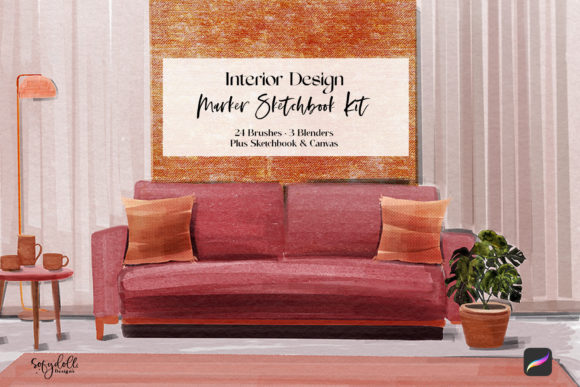
Mastering Digital Concept Art with the Interior Design Marker Sketchbook Kit
In the fast-paced world of interior design, the ability to communicate visual ideas quickly and effectively is paramount. While sophisticated 3D rendering software has its place, there remains an irreplaceable value in the immediacy and expressiveness of hand-drawn sketches. Clients often connect more deeply with a sketch that feels human and organic rather than a sterile, computer-generated image. However, traditional media comes with logistical challenges: carrying heavy supplies, dealing with ink bleed, and the inability to easily edit mistakes. This is where the Interior Design Marker Sketchbook Kit bridges the gap, offering a digital solution that retains the soul of analog drawing while leveraging the power of modern technology.
The Challenge of Traditional vs. Digital Workflow
Many designers struggle to find a workflow that balances speed with aesthetic quality. Traditional alcohol-based markers are excellent for blending and layering, but they require specific paper, ventilation, and a steady hand. Once the ink hits the page, errors are permanent. On the other hand, standard digital brushes often feel too clean or synthetic, lacking the texture and unpredictability that give architectural sketches their character. Designers need a tool that mimics the tactile feedback of marker on paper without the physical constraints.
The Interior Design Marker Sketchbook Kit addresses these pain points by providing a specialized ecosystem within Procreate. It is not just a collection of brushes; it is a curated environment designed to replicate the traditional marker experience. By simulating the way ink interacts with paper grain, this kit allows professionals to produce presentation-ready concepts rapidly, whether they are working from a client’s living room or a coffee shop.
Understanding the Toolkit Components
To truly benefit from this resource, it is essential to understand what is included and how each component serves a specific function in your design process. The kit is comprehensive, ensuring you have everything needed to start sketching immediately upon import.
- 24 Marker Brushes: These are the core of the kit, engineered to mimic various tip sizes and ink flows found in professional architectural markers. They allow for bold strokes and fine detailing alike.
- 3 Blender Brushes: Achieving smooth gradients and soft shadows is critical in interior visualization. These blenders help merge colors seamlessly, replicating the effect of using a colorless blender pen on paper.
- Digital Sketchbook (8.5″ x 11″): The included template provides a structured landscape format with a cover page and two inside pages. This structure helps organize thoughts and keeps presentations tidy.
- Canvas Texture: A high-quality paper texture overlay ensures that your digital strokes interact with a surface that feels real, adding depth and authenticity to your work.
It is important to note that this kit is designed exclusively for Procreate. To utilize the full potential, particularly the ‘page assist’ feature which streamlines navigation between sheets, you must have the latest version of Procreate 5.2 or newer. The hardware requirements are straightforward: an iPad (preferably an iPad Pro for performance) paired with an Apple Pencil ensures the pressure sensitivity needed to control ink flow accurately.
Practical Applications for Design Professionals
The versatility of the Interior Design Marker Sketchbook Kit makes it suitable for various stages of the design process. For initial concepting, designers can use the broader marker brushes to block out spatial relationships and furniture layouts quickly. The ability to duplicate pages within the digital sketchbook means you can iterate on multiple design options side-by-side without wasting physical paper.
During client meetings, the kit shines as a communication tool. Instead of showing static images, you can sketch live in front of the client, adjusting colors and forms based on their immediate feedback. The blender brushes allow you to soften edges or add atmospheric lighting on the fly, making the collaboration dynamic and engaging. Furthermore, because the file is digital, you can email the sketch to the client immediately after the meeting, reinforcing your professionalism and efficiency.
Customization and Flexibility
One of the significant advantages of this digital approach is customization. While the kit comes with a pre-formatted sketchbook, every element is adjustable. You can change the cover design to match your branding, alter the background color to suit different lighting scenarios, or swap textures if you prefer a smoother or rougher paper feel. This level of control ensures that your digital output aligns with your personal style or firm’s identity.
For users who need more than the initial three pages, the digital sketchbook is infinitely expandable. You can simply duplicate existing pages to create a whole new journal for a specific project. This scalability is impossible with physical sketchbooks, where running out of pages mid-project can be disruptive.
Getting Started: Import and Setup
Implementing the Interior Design Marker Sketchbook Kit into your workflow is straightforward. After downloading the zipped file, unzip it on your device. Double-clicking the brushset file will automatically import the tools into Procreate. The same process applies to the paper textures and color palettes. Ensuring your software is up to date is crucial; older versions of Procreate may not support the advanced features embedded in these brushes, such as streamline stabilization or custom dynamics.
Once imported, take time to test the brushes on the provided canvas texture. Experiment with pressure sensitivity to understand how light touches differ from heavy strokes. This practice phase is vital for mastering the digital marker feel, allowing you to build muscle memory before applying it to client work.
Tailoring the Approach to Your Needs
Different designers will approach this kit differently based on their specialization. Residential designers might focus on warm tones and soft textures to create inviting atmospheres, utilizing the blender brushes extensively for fabric and lighting effects. Commercial designers, conversely, may prioritize sharp lines and high-contrast shadows to emphasize structural elements and spatial clarity, relying more on the finer marker tips.
Students and educators can also benefit significantly. The kit provides a low-risk environment for learning perspective and color theory. Mistakes are easily undone, encouraging experimentation without the fear of ruining expensive materials. Additionally, the digital format makes it easy to share progress and receive critiques remotely.
Conclusion
The Interior Design Marker Sketchbook Kit represents a thoughtful fusion of tradition and innovation. It respects the artistic heritage of hand-rendering while embracing the efficiencies of digital tools. By providing realistic marker behaviors, customizable templates, and seamless integration with Procreate, it empowers designers to create compelling visuals with greater ease and flexibility. Whether you are refining a final proposal or brainstorming initial concepts, this kit offers the practical solutions needed to elevate your design communication.