Pineapple Brush: A Simple Digital Tool for Vibrant Creative Projects
Digital art and design often feel overwhelming because of the sheer volume of tools available. You open your software, stare at thousands of brushes, and still cannot find the right texture for a summer-themed social media post or a tropical invitation card. This is where a specialized tool like the Pineapple Brush becomes valuable. It is not just another file in your library; it is a targeted solution for creators who need instant, recognizable, and cheerful visual elements without spending hours drawing from scratch.
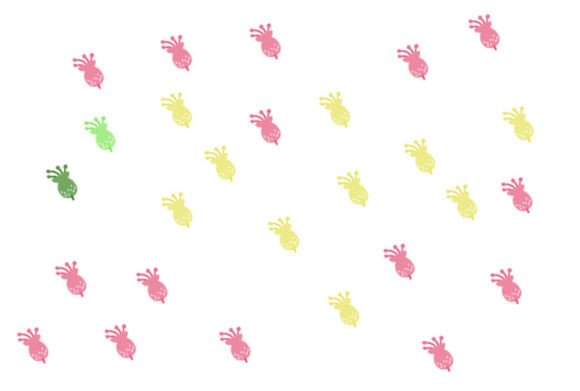
The concept is straightforward. You download a single, high-quality brush that mimics the texture and shape of a pineapple. Whether you are working in Photoshop, Procreate, or other compatible design software, this brush allows you to stamp, paint, or pattern with ease. The simplicity is its greatest strength. Instead of wrestling with complex layer styles or vector paths, you get immediate results that fit a specific aesthetic. For busy freelancers, small business owners, or hobbyists, time is a currency you cannot afford to waste on reinventing the wheel.
Why Specificity Matters in Digital Design
In the world of digital content, generic assets rarely stand out. A standard circle or square does not convey mood. However, a pineapple instantly evokes feelings of warmth, hospitality, and summer vibes. Using a dedicated Pineapple Brush allows you to tap into these associations quickly. This is particularly useful for marketers and bloggers who need to create cohesive visual identities for seasonal campaigns.
Consider the practical side of downloading this resource. The package typically includes a ZIP file containing either a .brushes file or .swatches, depending on your preferred software. Inside, you will find exactly one brush. This might seem minimal compared to massive bundles, but it reflects a curated approach. You are not paying for filler content; you are getting a precise tool designed to do one job well. For users who prefer clean, organized libraries over cluttered folders, this focused approach is a relief.
Real-World Applications for Creators and Entrepreneurs
The utility of this brush extends far beyond simple digital painting. Here is how different professionals can integrate it into their daily workflows:
- Social Media Managers: When creating Instagram stories or Pinterest pins for a travel agency or a beverage brand, adding subtle pineapple textures can reinforce a tropical theme. You can use the brush to create borders, background patterns, or accent icons that draw attention to key text without overpowering the message.
- Small Business Owners: If you run a boutique selling summer apparel or home decor, you can use the brush to design custom packaging inserts or thank-you cards. A hand-stamped look adds a personal touch that mass-produced graphics often lack.
- Educators and Bloggers: Teachers creating engaging worksheets for geography or biology lessons can use the brush to illustrate tropical ecosystems. Bloggers writing about healthy eating or smoothie recipes can add playful visual cues that break up long blocks of text, making the content more digestible and visually appealing.
- Freelance Designers: When working on client projects with tight deadlines, having a reliable set of thematic brushes speeds up the mockup phase. You can quickly test layout ideas with tropical motifs before committing to detailed vector work.
Technical Considerations Before You Download
Before you add the Pineapple Brush to your toolkit, it is essential to understand how it fits into your existing workflow. Since the download contains a single file, compatibility is key. Most modern design software supports standard brush formats, but you should verify whether your version requires .abr (Photoshop), .brushset (Procreate), or another format. The inclusion of .swatches suggests that the tool might also be used for color sampling or pattern generation, offering flexibility beyond simple stamping.
Another factor to consider is resolution. High-quality brushes maintain clarity even when scaled up. If you plan to use the pineapple motif for large-format prints, such as banners or posters, ensure the brush settings allow for high-resolution output. For web-based content, standard resolution is usually sufficient, but knowing your end goal helps you adjust opacity and flow settings appropriately.
Enhancing Creativity Without Complexity
One of the most significant benefits of using a specialized brush is the reduction of cognitive load. When you are brainstorming ideas, you want to focus on composition and messaging, not on the technical mechanics of drawing a fruit. With a pre-made Pineapple Brush, you can experiment freely. Try overlapping stamps to create a dense jungle effect, or use low opacity for a subtle watermark. The single-brush format encourages mastery. Instead of skimming through hundreds of options, you learn the nuances of one tool, discovering how pressure sensitivity, angle jitter, and spacing can transform a simple stamp into a dynamic design element.
This approach aligns with the principle of intentional creativity. By limiting your tools, you often expand your ingenuity. You might find yourself combining the pineapple texture with bold typography or contrasting colors in ways you had not considered before. This is especially true for hobbyists who may feel intimidated by professional-grade software. A single, easy-to-use brush lowers the barrier to entry, making digital design feel accessible and fun.
Making the Right Choice for Your Project
When deciding whether this tool is right for you, ask yourself what problem you are trying to solve. If you need a versatile, all-purpose brush pack, this might not be the best fit. However, if you frequently work on projects with a tropical, summer, or fruity theme, the Pineapple Brush is a highly efficient asset. It saves time, ensures consistency, and adds a unique character to your work.
Also, consider the source. Reliable creators provide clear instructions on installation and usage. Look for reviews or previews that show the brush in action. Seeing real examples helps you gauge whether the style matches your aesthetic. Remember, the goal is not to collect digital hoards but to build a toolkit that supports your specific creative vision.
In conclusion, the value of the Pineapple Brush lies in its specificity and ease of use. It is a practical solution for anyone looking to inject a bit of tropical flair into their digital projects without the hassle of complex design processes. Whether you are a seasoned designer or a beginner exploring digital art, this tool offers a straightforward way to enhance your visuals. By focusing on quality over quantity, it respects your time and creativity, allowing you to produce work that is both professional and personally satisfying. Embrace the simplicity, experiment with the textures, and let your designs reflect the warmth and vibrancy that the pineapple symbolizes.