Streamlining Creative Workflows with The Crazy Paisley Pattern Maker
In the fast-paced world of digital design, efficiency is often just as valuable as raw talent. Whether you are a freelance graphic designer juggling multiple client deadlines, a small business owner creating marketing materials, or a hobbyist looking to elevate your digital scrapbooking, the time spent on repetitive tasks can quickly eat into your creative energy. This is where specialized tools like The Crazy Paisley Pattern Maker become essential components of a modern creative toolkit. It is not merely a collection of brushes; it is a systematic approach to generating complex, vibrant backgrounds without the steep learning curve associated with manual vector illustration.
Understanding how to integrate this brush pack into your broader workflow requires shifting your perspective from viewing it as a simple asset to seeing it as a process accelerator. By leveraging pre-designed stamps and textures, you can maintain high visual standards while significantly reducing production time. This article explores practical ways to implement The Crazy Paisley Pattern Maker into various professional and personal projects, ensuring that your output remains consistent, high-quality, and uniquely yours.
Integrating Pattern Creation into Your Design Pipeline
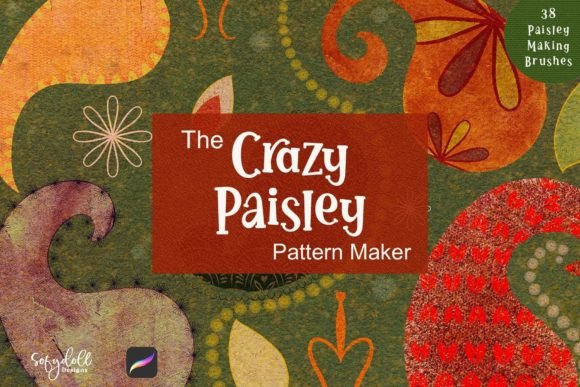
For many creators, pattern design is often an afterthought or a bottleneck in the project timeline. Traditional methods involve drawing individual elements, arranging them manually, and struggling with seamless tiling. The Crazy Paisley Pattern Maker disrupts this inefficient cycle by providing a modular system. The set includes 38 distinct Paisley Maker Brushes and one Canvas Texture, offering a comprehensive suite for rapid background generation. When you understand where this tool fits in your pipeline, you can use it to handle the heavy lifting of background creation, allowing you to focus on foreground elements and typography.
Consider the typical workflow of a marketer preparing social media assets. The need for fresh, eye-catching backgrounds is constant. Instead of starting from a blank canvas, you can initiate the process by selecting a base paisley stamp from the pack. This initial step sets the structural tone of the design. From there, the process becomes intuitive: fill the stamp with brand-aligned colors, add a border, and layer in embellishments. This method ensures that even when working under tight deadlines, the final output retains a hand-crafted aesthetic rather than looking like a generic stock image.
Pre-Production Planning and Asset Organization
Successful implementation begins before you even open your design software. Effective use of The Crazy Paisley Pattern Maker relies on preparation. Start by organizing your color palettes. Since the brushes allow you to fill shapes with color, having a predefined library of hex codes or swatches that match your client’s brand identity or your personal style will speed up the execution phase. Create folders for different moods—such as "vibrant," "muted," or "monochrome"—so you can quickly access the right tonal range during the creative flow.
Additionally, familiarize yourself with the 38 brushes included in the set. Not every brush serves the same purpose. Some may be better suited for large, dominant motifs, while others work well for subtle filler elements. Spend time testing each brush on a separate document to understand its scale, opacity behavior, and spacing. This preliminary exploration prevents trial-and-error frustration during actual client work. By knowing which brushes create dense patterns versus airy, spaced-out designs, you can make informed decisions faster when a project brief arrives.
Execution: Building Layers for Depth and Interest
The core strength of this tool lies in its layering capability. A common mistake among new users is applying a single stamp and calling it a day. However, true visual interest comes from complexity. To achieve a professional-grade background, start with a primary paisley element. Use the brush to place your main motif. Next, introduce variation by rotating the stamp or adjusting its size. This breaks the monotony and creates a more organic feel.
Once the primary elements are in place, utilize the additional elements mentioned in the package description. Add smaller embellishments around the main shapes to fill negative space. This technique mimics the intricate detail found in traditional textile design but achieves it in a fraction of the time. The included Canvas Texture plays a crucial role here. Applying this texture over your colored paisley elements adds grit and realism, preventing the design from looking too flat or digital. It bridges the gap between vector precision and tactile warmth, a quality highly prized in contemporary design trends.
When working on larger projects, such as website headers or print packaging, consistency is key. Use the same subset of brushes across all related assets to maintain visual cohesion. For instance, if you use three specific paisley stamps for a brochure cover, reuse those same stamps for the interior page backgrounds, perhaps altering only the color scheme. This strategy reinforces brand recognition and creates a unified user experience.
Compatibility and Technical Considerations
While The Crazy Paisley Pattern Maker is designed for ease of use, understanding its technical environment ensures smooth operation. These brushes are typically compatible with major raster-based design software. Ensure your software is updated to support the latest brush formats to avoid installation issues. If you are working in a team environment, share the brush file along with any custom color palettes you develop. This standardization allows multiple designers to produce work that looks like it came from a single hand, maintaining quality control across collaborative projects.
Resolution is another critical factor. Since these are brush-based tools, the output quality depends on your canvas settings. Always start with a high-resolution document, especially if the final product is intended for print. While digital screens are forgiving, printed materials require sharp edges and clear details. Test your patterns at 100% zoom to check for pixelation or unwanted artifacts. If necessary, adjust the brush spacing settings to ensure a seamless repeat without visible gaps or overlaps.
Post-Production and Long-Term Utility
After generating your pattern, the work is not necessarily done. The output from The Crazy Paisley Pattern Maker serves as a foundational layer. In post-production, consider how this background interacts with foreground content. If text will be overlaid, you may need to reduce the opacity of the pattern or apply a blur effect to ensure readability. This adaptability makes the tool versatile for various applications, from busy social media graphics to subtle email newsletter backgrounds.
Long-term, this brush pack becomes a valuable asset in your resource library. Unlike trend-specific templates that may date quickly, paisley is a timeless motif. By mastering this tool, you build a reusable skill set. You can revisit old projects and refresh them with new color combinations without redesigning the underlying structure. This scalability is particularly beneficial for entrepreneurs and freelancers who need to maximize the return on investment for every tool they purchase.
- Versatility: Suitable for digital and print media, including web banners, packaging, and textiles.
- Efficiency: Reduces pattern creation time from hours to minutes.
- Customization: Allows for infinite variations through color and layer adjustments.
- Professional Finish: Includes textures that add depth and authenticity to digital designs.
Ultimately, The Crazy Paisley Pattern Maker is more than a fun-filled brush pack; it is a strategic resource for anyone serious about efficient, high-quality design. By integrating it into your workflow with intention and planning, you transform a potentially tedious task into a streamlined, enjoyable part of your creative process. Whether you are designing a single invitation or a full brand identity system, this tool empowers you to deliver vibrant, professional results with confidence and speed.