Unlocking Digital Elegance: A Guide to Shimmer Glitter Procreate Watercolor Brushes
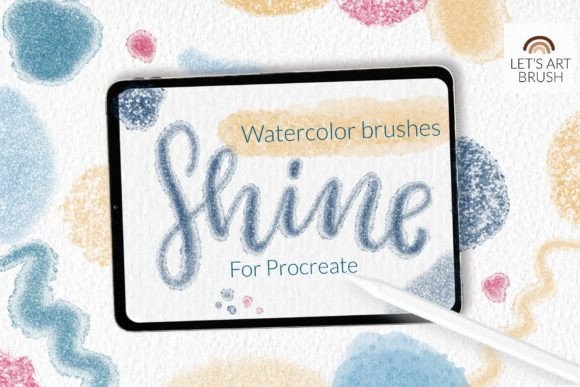
In the rapidly evolving world of digital art, the line between traditional media and digital precision continues to blur. Artists are no longer forced to choose between the organic unpredictability of watercolors and the convenience of digital editing. With tools like the Shimmer Glitter Procreate Watercolor brush set, creators can now achieve the delicate transparency of wet-on-wet techniques combined with the dazzling allure of metallic glitter. This guide explores how these specialized tools work, why they matter for modern creatives, and how you can seamlessly integrate them into your workflow.
The Fusion of Texture and Light in Digital Art
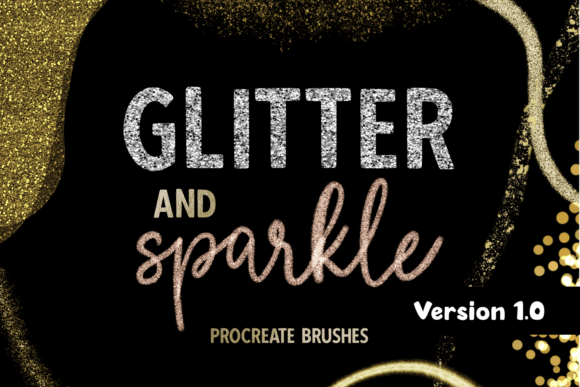
Watercolor has long been cherished for its fluidity and ethereal quality. However, replicating the specific texture of paper grain and the way pigment settles into those fibers is notoriously difficult in a digital environment. Standard digital brushes often feel too uniform or "plastic." This is where high-quality custom brushes, such as the Shimmer glitter watercolor texture brushes, become essential. They are engineered to mimic the physical behavior of real paint while adding a layer of digital magic that physical paints cannot easily achieve: consistent, adjustable shimmer.
The significance of this toolset lies in its versatility. Whether you are a professional illustrator designing wedding invitations, a calligrapher practicing lettering, or a hobbyist creating social media graphics, the ability to add silver glitter and watercolor textures instantly elevates the perceived value of the artwork. It bridges the gap between flat digital design and tactile, luxurious print aesthetics.
Understanding the Brush Set Components
To truly leverage these tools, it is important to understand what is included in the package and how each component serves a different creative purpose. The Shimmer Glitter Procreate Watercolor collection is not just a single tool but a curated ecosystem designed for cohesion.
- 7 Glitter Watercolor Brushes: These are the core of the set. Designed specifically for lettering and calligraphy, they balance opacity with transparency. They allow for smooth strokes that retain a hand-drawn feel.
- Dynamic Grain Scaling: One of the most impressive technical features is the ability of the glitter brushes to adjust their grain size based on your canvas dimensions. Whether you are working on a small icon or a large poster, the big grain and small grain details scale appropriately, ensuring your texture never looks pixelated or disproportionately large.
- Shimmer Watercolor Texture: Beyond just glitter, these brushes embed a subtle watercolor wash effect, giving depth to the background of your strokes.
- 1 Color Swatch File: To help you start immediately, the set includes a pre-configured color swatch palette. This saves time on color theory experimentation and ensures your glitters complement typical watercolor hues.
It is crucial to note that this is a brushset file. You will receive one consolidated file containing all the brushes, which makes organization within Procreate much cleaner than importing individual files.
Practical Applications in Modern Creativity
Why should an artist invest time in learning these specific brushes? The answer lies in current design trends. There is a growing demand for "handcrafted" digital aesthetics. Brands want logos that feel personal; influencers want backgrounds that feel warm and inviting. The silver glitter brush and its counterparts allow for rapid creation of assets that fit this trend.
For example, consider a digital planner creator. Using standard solid colors can make a planner look rigid. By applying these watercolor glitter brushes to headers and dividers, the planner gains a soft, luxurious feel that appeals to customers looking for a premium experience. Similarly, in educational contexts, teachers creating digital worksheets can use these brushes to highlight key terms without the harshness of neon markers, maintaining a calm and engaging visual environment.
Common Misunderstandings About Digital Textures
A common assumption among beginners is that digital glitter will look tacky or overly artificial. This usually happens when using low-quality brushes that simply stamp a static image of sparkles onto the canvas. High-quality tools like the Shimmer Glitter Procreate Watercolor brushes avoid this by using complex noise algorithms and blending modes. The glitter interacts with the underlying color, appearing to sit within the paint rather than floating awkwardly on top. Understanding this distinction helps artists trust the tool and experiment with layering techniques.
How to Install Procreate Brushes Correctly
Even the best tools are useless if you cannot install them properly. Technology can be frustrating, especially when dealing with file formats like .brush and .brushset. Below is a comprehensive guide to getting your new tools up and running. Please pay close attention to version requirements, as compatibility is key.
Note: This brushset requires Procreate version 5.0 or later. If you are using Procreate version 4.0 or earlier, this specific brushset format is not available. However, for those with older iPads or software versions, the general installation method for individual .brush files is outlined below.
Method 1: Installing Individual .brush Files (For Older Versions)
If you have an older iPad or are using Procreate version 4.0 or earlier, you may need to install brushes individually rather than as a set. Here is the step-by-step process:
- Download the File: Ensure the
.brushfile is downloaded to a accessible folder on your iPad, such as the "Files" app or "On My iPad." - Locate the File: Open your file manager and navigate to the folder containing the downloaded brush.
- Initiate Sharing: Tap and hold the
.brushfile with your finger or Apple Pencil until a menu appears. - Select Share: Choose the "Share" option from the contextual menu.
- Find Procreate: Look for the option "Open in Procreate." If you do not see it immediately, click on "More" to expand the list of apps.
- Import: Scroll through the list, find "Open in Procreate," and tap it. The brush should automatically import into your last used brush library.
- Verify: Open your project in Procreate and click on the brush icon at the top right corner to confirm the brush is available.
Method 2: Importing via Procreate Interface (Recommended for Newer Versions)
For users with updated software, this method is often more reliable and allows for better organization of your new Shimmer Glitter Procreate Watercolor tools.
- Open Procreate: Launch the app on your iPad.
- Create a Collection: It is good practice to keep new brushes organized. Click on the brush library, then tap the "+" sign to create a new collection. Name it something like "Glitter Watercolors."
- Import the Brush: With your new collection selected, tap "Import." Alternatively, you can drag and drop the
.brushsetfile directly from your Files app into the Procreate brush library window. - Locate the Download: Navigate to the folder where you saved the download. Select the file.
- Completion: The brushes will be added to Procreate instantly. You can now access all 7 brushes and the texture options within your new collection.
Maximizing Your Creative Potential
Once installed, the journey of mastery begins. Do not be afraid to experiment with the size and opacity settings. The beauty of digital watercolor is that you can layer multiple passes of the silver glitter brush to build intensity, or keep it light for a subtle hint of sparkle. Combine these brushes with standard Procreate blending modes like "Multiply" or "Overlay" to create even more complex interactions between your glitter and background colors.
Remember, tools are only as good as the vision behind them. The Shimmer Glitter Procreate Watercolor set provides the technical capability to produce stunning, textured art, but your unique style brings it to life. Whether you are crafting intricate calligraphy or broad, expressive washes, these brushes offer the reliability and beauty needed to make your digital work stand out in a crowded online space.
By understanding the installation process, respecting the software requirements, and exploring the nuanced features of grain scaling and texture, you equip yourself with a powerful asset in your digital toolkit. Happy creating, and let your art shine.
© Let s Art ♡