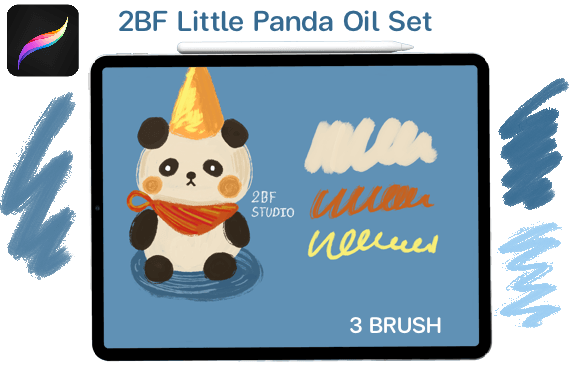
Bringing Traditional Texture to Digital Art with the Procreate Little Panda Oil Brush
Digital painting has come a long way from the flat, plastic-looking strokes of early software. Today, artists crave the tactile satisfaction of traditional media—the resistance of canvas, the viscosity of paint, and the subtle imperfections that give a piece its soul. This is where the Procreate Little Panda Oil Brush steps in. It is not just another tool in your library; it is a bridge between the physical and digital worlds, designed specifically for those who want their iPad art to feel authentic rather than computed.
If you are a creator looking to elevate your workflow, understanding how this specific brush set functions can change the way you approach illustration. Unlike generic round brushes that rely solely on opacity and flow, these oil brushes simulate the physical behavior of pigment. They blend, drag, and layer in ways that mimic real-world physics, allowing for a more intuitive and expressive creative process.
Why Texture Matters in Modern Digital Illustration
In an era saturated with clean, vector-based graphics and AI-generated smoothness, texture has become a premium asset. Whether you are a freelance illustrator working on book covers, a marketer designing social media assets, or a hobbyist journaling your daily life, texture adds depth and credibility to your work. The Little Panda Oil Brush collection provides this depth without requiring you to master complex layer blending modes or spend hours adjusting settings.
The primary advantage here is efficiency. When you download the 1 x brush.zip file containing the 3 brush set, you are getting a curated toolkit that works out of the box. There is no need to tweak pressure curves or grain settings. This immediacy is crucial for professionals who bill by the hour or educators who need to demonstrate techniques quickly without getting bogged down in technical troubleshooting.
Real-World Applications for Diverse Creators
The versatility of these brushes means they fit into various professional and personal scenarios. Here is how different users can leverage this tool effectively:
- Children’s Book Illustrators: The soft, blendable nature of oil brushes is perfect for creating whimsical, warm characters. The ability to layer colors without them turning muddy allows for vibrant, engaging pages that appeal to young readers.
- Concept Artists: When blocking out environments or character designs, you need speed and atmosphere. These brushes allow for rapid gestural strokes that establish mood and lighting quickly, helping you iterate on ideas faster than with rigid line tools.
- Social Media Content Creators: Hand-lettered quotes or illustrated backgrounds stand out in a feed dominated by stock photos. Using an oil brush gives your graphics a handmade, artisanal feel that resonates with audiences seeking authenticity.
- Educators and Tutors: Teaching digital art can be intimidating for beginners accustomed to pencil and paper. These brushes provide a familiar feeling, reducing the learning curve and helping students focus on composition and color theory rather than software mechanics.
Technical Requirements and Compatibility
Before diving into creation, it is vital to ensure your setup is compatible. These brushes are engineered exclusively for Procreate on the iPad. They will not function in Photoshop, Clip Studio Paint, or any desktop-based software. This specificity ensures that the brush engine interacts correctly with Apple Pencil’s tilt and pressure sensitivity, which is critical for achieving that realistic oil paint effect.
You must have an iPad capable of running the latest version of Procreate. While older models may work, the iPad Pro series offers the best experience due to its superior processing power and display technology, which renders the brush textures more accurately. Remember, the delivery is an Instant Download, so please make sure you are on your iPad when you download your file. Downloading to a computer first can sometimes lead to extraction issues or compatibility errors if the file is not transferred correctly via AirDrop or iCloud.
What You Receive
Upon purchase, you will receive a single compressed file: 1 x brush.zip. Inside, you will find 3 brush presets. This concise selection is intentional. Rather than overwhelming you with fifty variations of the same tool, this set focuses on three core functionalities—likely a base painter, a blender, and a detailer. This streamlined approach encourages mastery of a few tools rather than superficial use of many.
Maximizing Your Workflow with Oil Brushes
To get the most out of the Procreate Little Panda Oil Brush, consider your canvas size and resolution. Oil textures shine at higher resolutions where the grain details are visible. If you are working on a small Instagram post, the texture might appear too coarse. However, for high-resolution prints or detailed illustrations, the nuance of the brush strokes becomes a standout feature.
Layer management is also key. Unlike watercolors, oil paints are opaque. Use this to your advantage by building up highlights on top of darker underpaintings. Start with broad strokes to establish form, then switch to smaller brushes for refinement. The beauty of digital oil painting is the ability to undo mistakes instantly, allowing you to experiment boldly without the fear of ruining expensive canvas or materials.
Considerations Before You Buy
While these brushes are powerful, they are not a magic solution for poor technique. They require a steady hand and an understanding of light and shadow. If you are new to digital painting, expect a short adjustment period as you learn how much pressure yields the desired thickness of paint. Additionally, ensure your Apple Pencil tip is in good condition; a worn tip can affect the precision of the brush strokes, diminishing the realistic effect.
It is also worth noting that these brushes are resource-intensive. Complex textures require more processing power. If you are working on an older iPad model with multiple high-resolution layers, you might experience slight lag. Keeping your layer count manageable and merging layers when possible will help maintain a smooth drawing experience.
Final Thoughts on Digital Authenticity
The Procreate Little Panda Oil Brush represents a shift towards more human-centric digital art. It acknowledges that despite our advanced technology, we still crave the organic, imperfect beauty of hand-created work. By integrating this tool into your arsenal, you are not just adding a brush; you are adopting a workflow that values texture, depth, and artistic expression.
Whether you are illustrating a children’s story, designing a brand identity, or simply exploring your creativity, these brushes offer a reliable, high-quality solution. They respect your time with instant usability and respect your art with realistic performance. Just remember to download directly to your iPad, keep your Procreate app updated, and let the texture do the heavy lifting while you focus on the vision.