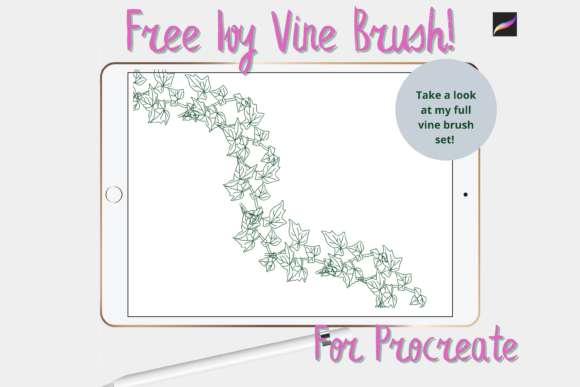
Procreate Ivy Vine Brush Guide
Digital illustration often feels like a balancing act between technical precision and organic flow. For artists who want to introduce natural elegance into their work without spending hours rendering every leaf by hand, specialized tools are essential. The Procreate Ivy Vine Brush serves as a prime example of how a single digital asset can streamline workflow while enhancing aesthetic quality. This instant download, hand-drawn digital brush is designed for versatility, bridging the gap between quick DIY projects and professional-grade design work.
Whether you are creating printed goods or continuing your journey in digital crafting, this tool offers a unique approach to botanical elements. It is not merely a stamp; it is a dynamic instrument that allows you to create gorgeous vines with fluid motion. Understanding how this specific brush functions within the Procreate ecosystem can help you decide if it aligns with your creative goals, skill level, and project requirements.
Understanding the Tool and Its Mechanics
At its core, this brush is part of the larger Mini Trezò Design brush pack, offered here as a gift to the community. However, its utility extends far beyond its price tag. The brush provides the ability to draw continuous, flowing ivy structures that mimic natural growth patterns. Unlike static clip art, which can feel rigid or repetitive, this brush responds to the pressure and tilt of your Apple Pencil, allowing for variation in line weight and density.
To use this tool effectively, you must have the correct hardware and software setup. These files are digital brushes that will only work within the Procreate App. Specifically, you need an iPad Pro with the Procreate App installed and an Apple Pencil. Without this specific combination, the brush cannot function. This requirement ensures that the pressure sensitivity and latency features necessary for smooth vine drawing are available.
Installation is straightforward but requires a few technical steps. You will need a platform to download the files, such as iCloud, and a program capable of unzipping files, like iZip. Once extracted, the files are imported into Procreate within a named folder. This process ensures your library remains organized, which is crucial for professionals managing large asset collections.
Why Different Creators Value This Brush
The appeal of the Procreate Ivy Vine Brush varies significantly depending on who is holding the stylus. What matters to a hobbyist may differ entirely from the priorities of a small business owner. Here is how different audiences might evaluate and utilize this tool.
For Beginners and Hobbyists
If you are new to digital art, drawing realistic foliage can be intimidating. Leaves require an understanding of perspective, light, and organic irregularity. This brush acts as a safety net, allowing beginners to produce polished results quickly. It serves as an excellent learning aid; by tracing over the generated vines, novices can study how natural curves interact. The primary priority here is ease of use and learning value. It reduces frustration and keeps motivation high by delivering immediate visual satisfaction.
For Professional Illustrators and Designers
Experienced users often look for efficiency rather than just ease. For a professional working on a tight deadline, painting every individual leaf on a border is time-consuming. This brush allows them to lay down the structural foundation of a vine in seconds. They can then use clipping masks with different textures to add depth and uniqueness, ensuring the final piece does not look generic. For this group, speed, flexibility, and quality are the deciding factors. The ability to customize the output via layers makes it a viable component in high-end commercial work.
For Small Business Owners and Entrepreneurs
Creators who sell print-on-demand products, such as greeting cards, invitations, or wrapping paper, need assets that are both beautiful and commercially viable. The hand-drawn nature of this brush gives products a boutique, artisanal feel that stands out against mass-produced digital clip art. Since this is an instant download, it supports rapid product development. An entrepreneur can create a new wedding invitation suite in a fraction of the time it would take to commission custom illustrations. Here, commercial value and presentation are key. The brush helps maintain a consistent brand aesthetic across various merchandise types.
For Educators and Content Creators
Bloggers, teachers, and social media influencers often need decorative elements to break up text or enhance visual storytelling. The ivy vine can frame quotes, separate sections in a newsletter, or add elegance to digital planners. For these users, the focus is on versatility. The brush can be used subtly for understated elegance or boldly for dramatic headers. Its compatibility with standard Procreate workflows means it integrates seamlessly into existing content creation pipelines.
Practical Techniques for Best Results
To get the most out of this brush, consider how it interacts with other Procreate features. While the brush looks great on its own, its true potential is unlocked when combined with layering techniques.
- Use Clipping Masks: Draw your vine on one layer, then create a new layer above it and set it as a clipping mask. Fill this top layer with textures, gradients, or colors. This allows you to change the appearance of the vine without altering its shape.
- Vary Pressure: Do not press too hard. Light strokes create delicate tendrils, while heavier pressure produces robust stems. Mimic the way real plants grow thinner at the tips.
- Combine Elements: Use the vine as a guide for other elements. You can paint flowers or berries along the path created by the brush, ensuring perfect placement and flow.
- Experiment with Opacity: Lowering the opacity of the brush can create background elements that add depth without distracting from the main subject.
Evaluating Fit for Your Projects
Before downloading, consider your specific project needs. If you are working on a hyper-realistic botanical study where scientific accuracy is paramount, a stamp-style brush may not offer the control you need. However, for decorative arts, scrapbooking, wall art, and stylized illustrations, this tool is highly effective.
Also, consider your technical comfort level. If you are unfamiliar with file management on iOS, the need to unzip files and import them manually might seem daunting initially. However, numerous tutorials exist to guide you through this one-time setup. Once installed, the workflow is seamless.
The long-term usefulness of this brush lies in its adaptability. It is not limited to a single style. By adjusting color palettes and combining it with other brushes, you can create everything from vintage Victorian borders to modern minimalist frames. This flexibility ensures that the tool remains relevant as your skills evolve.
Final Thoughts on Digital Botanicals
In the realm of digital design, tools that save time without sacrificing artistic integrity are rare. The Procreate Ivy Vine Brush offers a practical solution for adding organic beauty to digital and printed works. Whether you are a beginner looking to build confidence or a professional seeking to optimize your workflow, this brush provides a reliable foundation for creative expression.
Remember that the value of any digital asset is determined by how well it serves your specific creative vision. By understanding the technical requirements and exploring advanced techniques like clipping masks, you can transform a simple brush into a powerful component of your artistic toolkit. As you integrate this tool into your projects, you may find that it not only speeds up your process but also inspires new directions in your design work.